Digital Audio Recordings
Effective June 24, 2026, digital audio recordings can be uploaded to cases. This will eliminate the need for attorneys to file a Notice of Filing/Lodging to submit evidence via email or in disposable media to the court. The audio file can be uploaded in mp3 or wav format with a limit of 100MB.
Filing a Digital Audio Recording
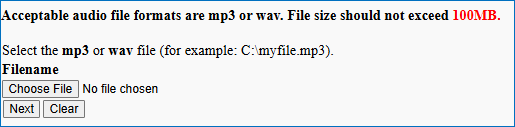
Select the event Digital Audio Recording Upload from the Other Filings – Other Documents category. Follow the prompts to enter the recording details and link to an existing entry on the docket (optional). The audio file upload screen is similar to the PDF upload screen. Click Choose File to browse and upload the audio file and Next.
Docket text appears as shown below. A one-page PDF document is automatically appended to the docket entry as the main document link.

Accessing a Digital Audio Recording
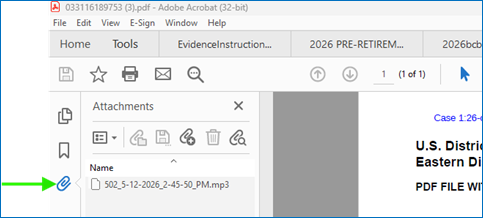
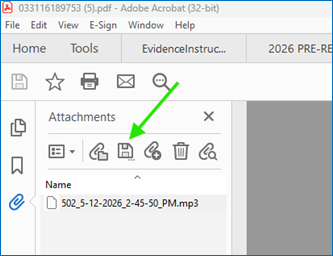
Go to the docket to find the digital audio entry. The audio icon in the entry is misleading as it does not open the audio file. To access the file, click on the document number link. Note: The PDF document must be opened in Adobe Acrobat. If the PDF automatically opens within the browser, save the file to your computer before opening in Adobe. Once opened in Adobe, click on the paper clip on the left column to display the actual file. Double-click on the file name.
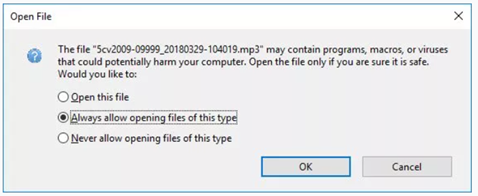
A dialog box (shown below) may appear. Select Always allow opening files of this type radio button to proceed and avoid this prompt in the future.
Your computer's default media player (ie Windows Media Player) should automatically begin playing the audio file. If prompted to select an app, select Windows Media Player or any other media player of your choice. The audio file will begin to play.
If you would like to download the file, click the disc icon to save the audio file to your computer.
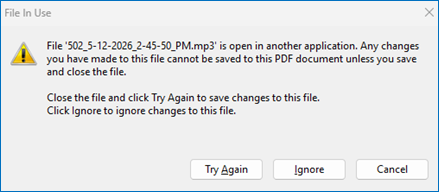
Note: The following message displays if you try to exit the PDF document prior to closing the media player. Close the player application before the PDF document.